Why? What? How? Scope?

Why are you migrating ?
This is ground-zero of your Cloud Migration Journey and here you need to:
|
Identify the reasons for moving to the cloud |
Why?
Ask yourself what business outcome you want to obtain by migrating to the cloud. Make sure that what you identify as your cloud migration’s “WHY” (the reasons to migrate) is tied to a business outcome. Tying your cloud migration’s why to a business outcome provides a universal motivation that anyone in the company can rally behind and it is very likely that it is already being tracked/measured which simplifies the quantify and track aspects of this phase.
|
|
Quantify those reasons with metrics and KPIs |
Why?
Open-ended goals and motivations can’t be measured hence can’t be objectively evaluated. If you can measure the reasons why you are migrating to the cloud with a metric or KPI then you can objectively identify where you are and where you want to be.
|
|
Track them over a reasonable period of time |
Why?
You need to be able to predict the expected behavior of those metrics and KPIs you identified as the ones measuring the reasons why you are migrating to the cloud. If you can’t baseline that behavior then you can’t evaluate if a particular measurement taken under specific circumstances is normal or not.
|
Why?
Once you measure your current stance in regards to your cloud migration goals then you need to identify what is the target value you want to achieve for that goal AFTER the cloud migration so you can have an objective way to measure success
|
The AD Financial case study
AD Financial has seen an exponential growth in loan applications in the last 12 months due to their aggressive marketing campaign.
This increase in traffic has caused recurrent P1 events that are trending up in frequency, duration and severity even after Avi’s team has invested significant amount of time, resources and effort into improving the back-end’s performance.
This situation has translated into less loans closed than anticipated.
AD Financial’s WHY moving to the cloud
The motivation to move into the cloud is “to improve loan revenue”
Explain
You can argue that AD Financial has increased number of P1s trending up in frequency, duration and severity but, if fixing them does not translate into better business outcomes why would decision-makers care?.
We heard that “This situation has translated into less loans closed than anticipated” which negatively impacts one of AD Financial’s main revenue avenues: Loans!
By attaching the cloud migration’s “why” to loan conversions we are defining the motivation for the migration as a business outcome one instead of a purely-technical one (we still need to move to the cloud in order to improve the loans’ revenue but our motivation to do so is not because the cloud is a good technical option but because its technical benefits enable us to reach our business goals)
AD Financial cloud migration’s target metrics and KPIs
The metric we are going to use to drive the cloud migration is “Loan Conversion Rate”
Explain
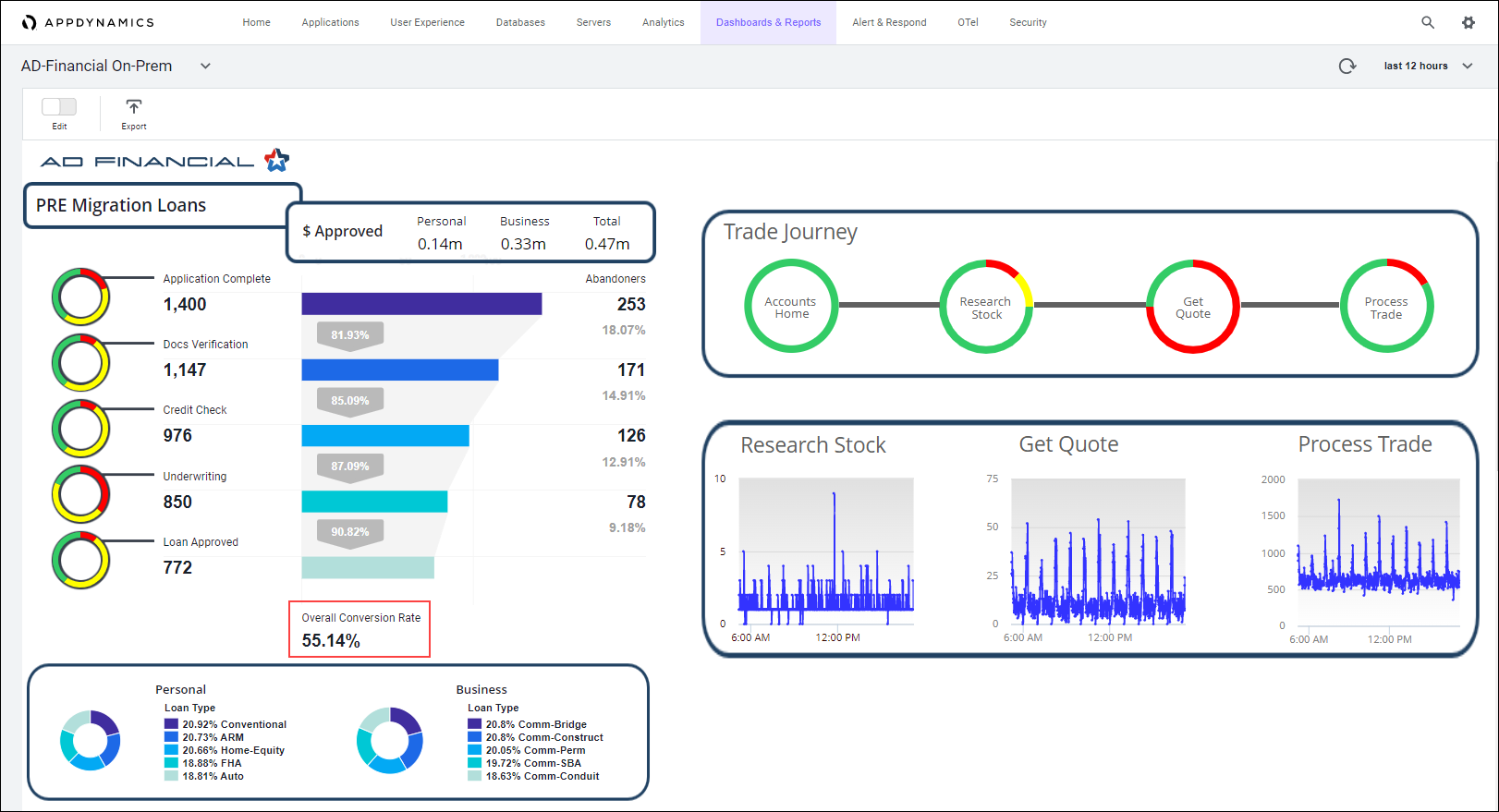
“Loan Conversion Rate” is a metric AD Financial currently uses to track its performance in regards to loans and it measures exactly what we defined the cloud migration motivation to be so it is the natural candidate in this case.
While in the process of defining the metrics and KPIs you are going to track during the cloud migration you can:
Use what you have: Identify what metrics and KPIs you are already tracking TODAY and from them, select the ones that help you measure what you identified as your cloud migration’s “why”
Generate what you need: Based on your cloud migration’s “why” identify the changes you need to introduce to your production environment and your monitoring tools to generate the information you need to track your cloud migration’s goals.
A mixture of both: You might also be faced with having to introduce changes to the production environment AND use metrics and KPIs you already have in order to track your cloud migration’s goals
AD Financial Loan Conversion Rate monitoring
One of the benefits of using an important business outcome as the cloud-migration metric is that it is very likely that we will already have its historical data and a well stablished process to track it.
Explain
“Loan Conversion Rate” is a metric AD Financial currently uses to track its performance in regards to loans and, because of that, its historical behavior is well documented and systematically tracked.
Any company should have a way to visualize the behavior of those critical business metrics and KPIs as part as their regular business operations. In AD Financial’s case we have a dashboard that let us know, real time, what the loans’ conversion rate is:
AD Financial cloud migration’s success criteria
10% increase in “Loan Conversion Rate”
Explain
Any project requires funding and funding is difficult to get if there is no clear Return On Investment (ROI).
This fact emphasises the importance of selecting a business outcome as the motivation of moving to the cloud as it will be easier to get funding approved if there is a clear path towards the business goals.
Every time the conditions allow it you should define a success criteria for the cloud migration that explains how the project will pay for itself and how long it will take to do so in order to allow decision-makers to visualize why the cloud-migration is the right step to take.
We have arbitrarily selected 10% increase in Loan Conversion Rate as the success criteria for this workshop but in a real scenario whatever value defined as success criteria needs to align with the business goals.
What is changing ?
Here you decide the changes you will introduce in your production environment.
Are you going to ?
Explain
A.k.a. lift-and-shift. Your application’s functionality and architecture stay the same and you only change the infrastructure used to support them. In this scenario you kind of use the cloud only as a ‘place’ to host your VMs.
|
Explain
When you re-factor/re-architect you change your application’s functionality and/or its architecture. Re-factoring means you consolidate or break apart code to make it more functional and modular. Re-architecting means you modify the way data is generatd, transported, handled, processed, stored and/or shared in the application.
|
Explain
While re-building you, basically, are re-writting the application from scratch ussually to make it into a cloud-native application (using things like k8s, auto-scaling, managed services, serverless, etc)
|
Explain
When you replace you use a third-party solution to replace the service/function your application was providing (For example if you decide to use Redis instead of your home-grown caching application)
|
The AD Financial case study
AD Financial has seen an exponential growth in loan applications traffic in the last 12 months due to their aggressive policies. This increase in traffic has brought the back-end architecture to its limits and its monolithic nature does not allow for an efficient and easy scaling approach. This is forcing AD Financial to implement multiple intances of the production environment and an elaborated data-synch processes in an attempt to handle the traffic spikes with limited success which has translated into a series of P1 events.
This increase in traffic has caused recurrent P1 events that are trending up in frequency, duration and severity even after Avi’s team has invested significant amount of time, resources and effort into improving the back-end’s performance.
Course of action
AD Financial is going to Re-factor/Re-architect its application while migrating to the cloud
Explain
Because AD Financial is unable to effectively and efficiently handle the current loans’ traffic it needs to use the auto-scaling capabilities of the cloud and break its monolithic application into microservices such that they can procure the right amount of resources given the fluctuating traffic conditions.
How do you deliver ?
Decide how are you going to deploy, in the production environment, the changes you are introducing:
Explain
In A/B testing, different versions of the same service run simultaneously as “experiments” in the same environment for a period of time. Experiments are either controlled by feature flags toggling, A/B testing tools, or through distinct service deployments. It is the experiment owner’s responsibility to define how user traffic is routed to each experiment and version of an application. Commonly, user traffic is routed based on specific rules or user demographics to perform measurements and comparisons between service versions. Target environments can then be updated with the optimal service version.
The biggest difference between A/B testing and other deployment strategies is that A/B testing is primarily focused on experimentation and exploration. While other deployment strategies deploy many versions of a service to an environment with the immediate goal of updating all nodes with a specific version, A/B testing is about testing multiple ideas vs. deploying one specific tested idea.
Pros: A/B testing is a standard, easy, and cheap method for testing new features in production. And luckily, there are many tools that exist today to help enable A/B testing.
Cons: The drawbacks to A/B testing involve the experimental nature of its use case. Experiments and tests can sometimes break the application, service, or user experience. Finally, scripting or automating AB tests can also be complex.
|
Explain
Blue-green deployment is a deployment strategy that utilizes two identical environments, a “blue” (aka staging) and a “green” (aka production) environment with different versions of an application or service. Quality assurance and user acceptance testing are typically done within the blue environment that hosts new versions or changes. User traffic is shifted from the green environment to the blue environment once new changes have been testing and accepted within the blue environment. You can then switch to the new environment once the deployment is successful.
Blue-Green vs Canary Deployment Strategies: The Blue-Green Deployment
Pros: One of the benefits of the blue-green deployment is that it is simple, fast, well-understood, and easy to implement. Rollback is also straightforward, because you can simply flip traffic back to the old environment in case of any issues. Blue-green deployments are therefore not as risky compared to other deployment strategies.
Cons: Cost is a drawback to blue-green deployments. Replicating a production environment can be complex and expensive, especially when working with microservices. Quality assurance and user acceptance testing may not identify all of the anomalies or regressions either, and so shifting all user traffic at once can present risks. An outage or issue could also have a wide-scale business impact before a rollback is triggered, and depending on the implementation, in-flight user transactions may be lost when the shift in traffic is made.
|
Explain
A canary deployment is a deployment strategy that releases an application or service incrementally to a subset of users. All infrastructure in a target environment is updated in small phases (e.g: 2%, 25%, 75%, 100%). A canary release is the lowest risk-prone, compared to all other deployment strategies, because of this control.
Pros: Canary deployments allow organizations to test in production with real users and use cases and compare different service versions side by side. It’s cheaper than a blue-green deployment because it does not require two production environments. And finally, it is fast and safe to trigger a rollback to a previous version of an application.
Cons: Drawbacks to canary deployments involve testing in production and the implementations needed. Scripting a canary release can be complex: manual verification or testing can take time, and the required monitoring and instrumentation for testing in production may involve additional research.
|
Explain
A rolling deployment is a deployment strategy that updates running instances of an application with the new release. All nodes in a target environment are incrementally updated with the service or artifact version in integer N batches.
Pros: The benefits of a rolling deployment are that it is relatively simple to roll back, less risky than a basic deployment, and the implementation is simple.
Cons: Since nodes are updated in batches, rolling deployments require services to support both new and old versions of an artifact. Verification of an application deployment at every incremental change also makes this deployment slow.
|
Explain
Depending on the circumstances, internal best practices, needs or goals you might end up using other less common strategis like Basic Deployment or Multi-Service Deployment. You can also elect to use a combination of deployment strategies or come up with you own
|
For additional information visit: Intro to Deployment Strategies: Blue-Green, Canary, and More
The AD Financial case study
As AD Financial workflow has been always running in their data center and is a giant monolithic application, there has not been a need to hire people with cloud background.
AD Financial’s technical teams are playing catch-up and getting trained/certified in cloud technologies as part of the cloud migration initiative.
This lack of cloud experience is placing AD Financial in a delicate situation as they have to move business critical workflow to the cloud with not enough experience to do so.
Course of action
AD Financial is going to use a mixture between Blue/Green Testing and Canary Testing as deployment method
Explain
The final decision on how to move to the cloud will heavily depend on how comfortable do the teams involved (design and operations) feel with what is going to happen.
That level of comfort will dictate the amount of changes to be introduced and how to deliver those changes. The less comfortable the teams feel about the cloud migration process the less changes will be accepted AND the less risky method of delivery they will used.
While selecting the delivery method, one of the main drivers is the amount of control in deploying AND reverting changes to the production environment.
The target workflow’s visibility, exposure and criticallity to the business and its customers is also a big driver in the decision of how to deploy changes to a production environment and defines the level of control needed for the migration.
In the AD Financial’s case, the lack of experience paired with the criticallity of the target workflow (loans) demands a lot of control in the deployment process while having an easy and quick roll back mechanism.
The Blue/Green deployment allows AD Financial to have both environments: the current and the new one, working simultaneously so rolling back, if needed, is an easy step.
The Canary Testing deployment allows AD Financial to surgically control the deployment, soaking periods and testing while the migration takes place.
The combination of these two deployment methods enables AD Financial to minimize any negative impact that may happen (in both: size and duration) to customers while being able to test the new code in a real-life environment (their actual production environment).
Observability Scope ?
Regardless of the cloud migration situation (On-Prem-to-Cloud, Hybrid, Cloud-to-Cloud, Multi-Cloud) the new environment introduces an observability challenge that needs to be addressed BEFORE the migration takes place.
Explain
Not only you need to make sure you are able to effectively measure your success criteria in the new cloud environment but all the MELT data that you currently track and that is relevant in the new environment.
Along with all of these ‘inherited’ MELT requirements comes the new MELT needs native to the cloud and to the architectures and services you are adopting.
Failing to address this observability challenge BEFORE the migration takes place will limit the understanding design and operations teams will have of the performance and behavior of the applications in the cloud.
All teams within the company need to carefully review the current level of observability they have in the production environment and evaluate what needs to be done to have the same (or better) level of visibility in the new environment.
Also critical is to make sure that the visibility is end-to-end, correlated and with business context so there is an easy way to identify how the performance of the production environment impacts the business outcomes.
This assesment might yield to new tools that need to be added and/or new code that needs to be written to generate, retrieve and process the data needed.
Doing this excercise as part of the pre-migration phase allows teams to anticipate the observability needs in the new environment and plan accordingly to have those covered in a timely fashion.
The AD Financial case study
AD Financial has opted for a re-factor/re-architect approach in regards to the changes to be introduced while moving to the cloud.
This means that there will be some changes to the application’s architecture (monolithic app broken into micro-services, auto-scaling, containers/K8s clusters and so forth). These changes bring with them new observability targets that AD Financial currently is not prepared to assume.
Moving into any new environment (let alone a cloud one where distributed resources is the norm) without the proper level of visibility is a risky move that needs to be avoided at all cost because lack of visibility translates into brand impact, lost businesses, missing opportunities and reduced market share.
Course of action
AD Financial has opted for a Full Stack Observability approach to visibility into their production environment once they move to the cloud.
Explain
Cloud technologies simplify software development and accelerates innovation but the price to pay is its exponetially complex observability challenge given the distributed nature of the cloud.
Close to real time, correlated, end-to-end data with business context is what is required in order to turn this exponentially complex observability challenge into a business strength that not only will allow companies to execute at top shape but grow the business along the way.
The Full Stack Observability approach enable companies to generate that kind of data regardless of where the production environment is running.
|
Pre-Migration Observability Scope |
| Before the migration takes place we will have special care in monitoring the success criteria |
Explain
We need to baseline the success criteria before the migration takes place so we can evaluate against its behavior after the migration.
The remaining monitoring activities traditionally observed will be kept in place (business as usual).
|
|
Migration Observability Scope |
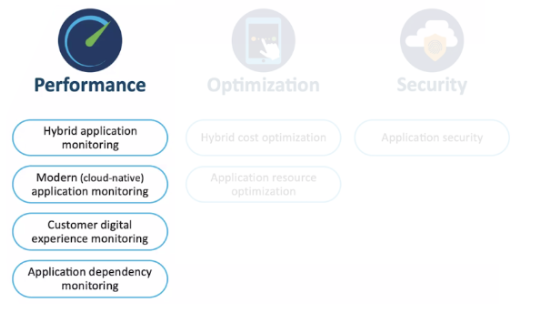
| During the actual migration the priority is business continuity so the monitoring will focus on performance |
Explain
Changes to the production environment are being introduced so we need to make sure that users are not being impacted negatively.
To that effect, we need to monitor:
- Application’s components running in Hybrid Environments (whether they live onPrem or in the cloud)
- Cloud Native components introduced as part of the cloud migration.
- User experience:
- Data at rest (while being processed at the mobile or browser)
- Data in transit (while moving between components)
- Applications’ dependencies (third party services)
|
|
Post-Migration Observability Scope |
| After the cloud migration takes place we validate success criteria and resume normal monitoring of the production environment |
Explain
Once the cloud migration is completed we need to measure our success criteria so we can compare with its baseline measured before the migration.
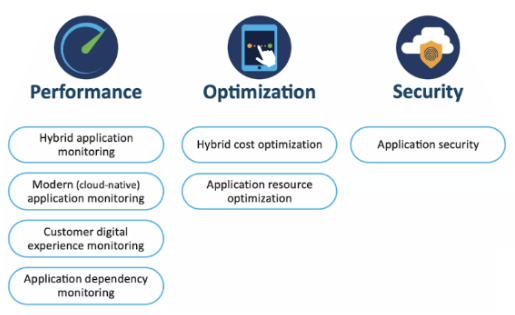
Additionaly, we need to resume regular monitoring activities in the new production environment where, along with performnace we will also:
- Measure use of resources in the data center (for hybrid environments) to make efficient and optimal use of them.
- Measure use of cloud resources (to control cloud spending)
- Monitor security (to prevent maliciious code from being exploited)
|
We’ll login to the AppDynamics Controler.